Product Updates

Keep track of what’s new, improved, changed, or fixed across Trading Paints products.

Improved

  • Fonts now show the text you’re inserting in the font selection dropdown menu, rather than a generic preview of the font name. This will provide a clearer and more accurate representation of how your text will look in each font instead of clicking through them one by one.

Fixed

  • Fixed an issue where Sim Preview wasn’t working on the Opera GX browser because it was expecting a Local Network Access prompt similar to other browsers.

Old:

Don’t post submissions to the Showroom that do not contain accurate iRacing screenshots. Everybody wants to see what your paint looks like when it’s in the sim (or iRacing 3D Car Viewer), not what it looked like in real life or in another game.

New:

Don’t post submissions to the Showroom that do not contain accurate iRacing screenshots. Everybody wants to see what your paint looks like when it’s in the sim (or iRacing 3D Car Viewer), not what it looked like in real life or in another game. Please don’t only use AI-generated preview images.

New

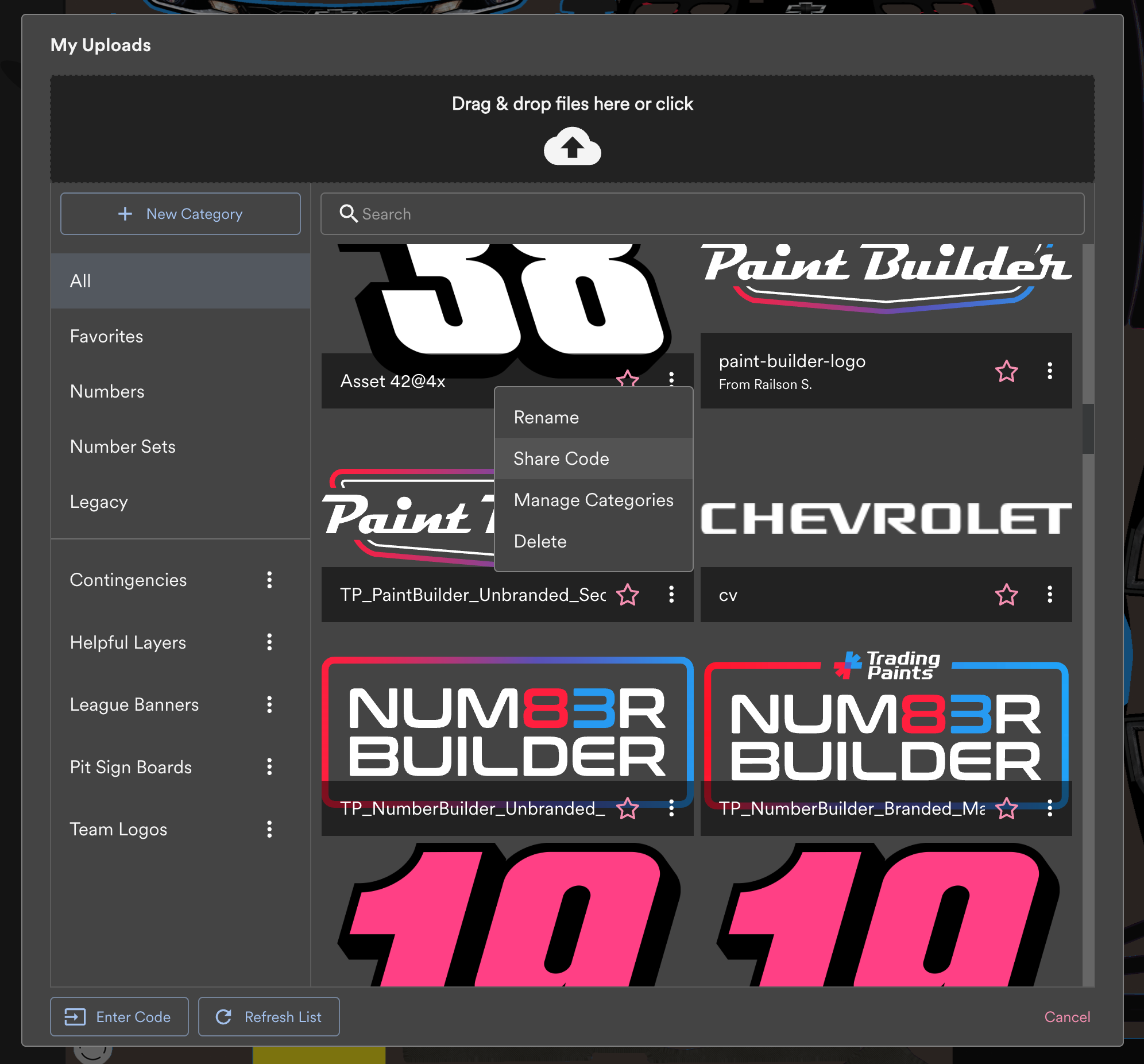
  • Added a “Refresh List” button to the My Uploads screen. This way, if you send a layer to Paint Builder via Number Builder, you can quickly reload your list of uploads without the need to reload the entire Paint Builder app.

Fixed

  • Fixed an issue where an error message appeared when attempting to clone a project.
  • Fixed an issue where text layers were not loading reliably in Firefox.
  • Fixed an issue where links were not styled properly in the What’s New display.

New

  • Added the new Number Layer functionality! On a number detail screen in the Number Showroom, you can now select a vehicle and generate a race-ready layer with your selected number already positioned, sized, and rotated exactly where numbers should go. Send your Number Layer right to Paint Builder (then find it in My Uploads → Number Sets) or download a transparent PNG for use in other software. Choose Contain to preserve your number’s aspect ratio within the number block, or Fill to stretch the number to fill the block.

Improved

  • Added a prompt to save first when exporting a project so that an old version of the project wasn’t exported.

Fixed

  • Fixed an issue where a new draft project could be assigned the name “Loading…” if there was a problem during project creation.
  • Fixed an issue where publishing to the Number Showroom via the My Numbers → Drafts screen was not working.

We’ve released a new update for Paint Builder to make painting even better!

We’ve released a new update for Paint Builder to make painting even better!

New

  • Added Number Set functionality from Number Builder. You can use the Number Builder Showroom to create a Number Layer and send a race-ready layer right to Paint Builder with your number positioned, rotated, and sized in all the correct areas. Find your Number Set layers in My Uploads under Number Sets. Number Set layers are assigned per vehicle.

Improved

  • If you’ve selected a layer group where all items within the group can be edited in the same way (e.g. color fill), you can now apply that property to the group to change all items within the group.
  • Added a new Paint Builder-specific favicon so you can more easily distinguish your Paint Builder browser tabs and bookmarks from other Trading Paints links.
  • Improved default empty input appearances in text fields so it is easier to see when you are using a default value.
  • Duplicating a layer now tries to respect its original order in the layers list.

Fixed

  • Fixed an issue where Shadow blur and offset were not applied correctly when rotating a scaled text layer.
  • Fixed an issue where text placement could appear differently for the same layer in different browsers.
  • Fixed an issue where the Custom Number selection appeared when racing a Helmet or Suit project. This could have resulted in racing a Custom Number helmet or suit, which iRacing does not support.
  • Fixed an error message that was displayed when a project that had too many layers.

Cleanup

  • Added a reminder note that you’ll need to enable Local Network Access if prompted by your browser in order to use Sim Preview.
  • Added an indicator to the What’s New button when there’s a new Paint Builder release.

Improved

  • In the editor view, a custom font can now be assigned from the Custom Font management pop-up by clicking the desired font.
  • On Showroom detail pages, changed the positioning of the tooltip on the Remix button so that other buttons would not be covered.
  • Updated Paint Builder icon.

Fixed

  • Fixed crashing and other issues using the Number Builder editor view in Safari.
  • Fixed an issue where, if a Showroom project was set to a custom font and then later changed to use a default font, preview options were not appearing.

New

  • Added the option to disable comments on a Number Showroom listing if desired. This option can be found in the Share menu. Comments are enabled by default.
  • Added the ability to use custom fonts when logged out or without an account, as was possible in older versions of Number Builder. (Note: draft links using custom fonts won’t include the custom font.)

Improved

  • When sharing a Number Builder link on social media or messaging apps, the preview image should remain in place for a longer period of time. Previously, the preview image expired after a certain amount of time, so images in shared link previews might have broken.

Fixed

  • Fixed an issue where font previews were not appearing for some fonts in the editor view and font filtering lists.
  • Fixed an issue where icons were appearing on top of the user menu when hovering over a Showroom card.

New

  • In addition to displaying the number of likes on a comment, we’ve added a view for who liked a comment when clicking the likes count.

Fixed

  • Fixed a bug where some fonts previews were not loading correctly in the Builder font list.
  • Fixed an issue on Showroom Detail pages where the “More by” heading appeared even when a member had no additional Showroom numbers posted.

We’ve updated Number Builder with some new features and fixes!

New

  • Commenting has been added on Showroom projects! Share your encouragement and leave a nice note for your favorite authors.

Improved

  • A confirmation message is now shown when you delete a project successfully.
  • The appearance of items in Private projects has been updated to show information in a cleaner and clearer way.
  • Links to member profiles from Showroom detail pages are smoother and do not result in the entire page reloading.
  • Adjusted the appearance of the posted and last modified dates of Showroom projects to avoid awkward text breaking.
  • Updated the appearance of Showroom quick-preview to make better use of space, particularly on smaller screens.

Fixed

  • Fixed an issue where the number preview could spill out of the preview window.
  • Fixed an issue where a horizontal scrollbar could appear on some small screens on Showroom detail pages.
  • Fixed an issue where the Favorites list would load a blank pop-up when logged-out. (Favorites are only viewable to logged-in members.)
  • Fixed an issue where imported projects without outlines were adding an outline when opened in the Builder view.
  • Fixed an issue where remixed projects could have been exported as JSON data, which would not include original author data.
  • Fixed an issue where draft projects were not importing their titles properly after exporting.

We’ve rolled out some more improvements for the new Number Builder.

New

  • Added member profile pages within the Number Showroom. Now you can show off your Public projects and find other members’ projects.
  • Added a display of more numbers from a member on a Showroom number detail page.
  • Added a Zoom to Fit option in the Builder interface. You can click the zoom magnifying glass to make your number take up the full available space.

Improved

  • Removed the confirmation prompt when deleting an outline. With Undo and Redo functionality, a confirmation is no longer necessary.
  • Miter value default has been set to 5. Previously, the default was 0, making Miter look the same as Bevel at first glance.
  • Adjusted the layout and positioning of timestamps on Showroom number detail pages at small/mobile screen widths.
  • Added a warning when attempting to copy the link of a Draft project that uses a custom font.
  • Added a Create New Number button to the My Numbers menu within the Builder interface.
  • Improved the Showroom Trending calculation to better reflect popularity.
  • Improved continuity between screens to prevent flashing and jumping.
  • When sharing a project, the recipient’s Customer ID Number is displayed along with their name.
  • Added a clearer success message when changing visibility of a project to Public (Showroom) from the Builder interface.
  • Renamed “Unsaved Draft” to “Draft” in the Builder interface. (Technically, draft projects are saved locally and are viewable in the Drafts tab.)
  • Increased size of number preview on Showroom detail pages on large (desktop) screens.
  • Numbers sent to Paint Builder are now placed into the My Uploads → Numbers category within Paint Builder.
  • Adjusted the display of member Pro status on Showroom listing cards. A blue outline and dot now appear around a profile image of a Pro member so that more space is available to display names.
  • Stats shown for a user (number of times favorited, number of projects) now feature Number Showroom stats rather than main Trading Paints Showroom stats.

Fixed

  • Fixed an issue where loading the Number Builder interface by URL directly would set the background color incorrectly.
  • Fixed an issue where a custom font name was not being displayed on the My Numbers Drafts tab.
  • Fixed an issue where member profile images were not being displayed correctly if using the default image.
  • Fixed an issue where the mobile navigation was not being closed after selecting an item.
  • Fixed an issue where Bluesky links were not displayed in the mini user bio on a Showroom number detail page.
  • Fixed an issue where the Sign In button in the mobile navigation drawer was too small.
  • Fixed an issue where some characters in member names were not being displayed properly.
  • Fixed an issue where a wayward custom font message appeared in the Builder interface when searching for a font in the list.
  • Fixed an issue where the background of a number’s social sharing preview would make the project title, author name, and Number Builder logo unreadable.
  • Fixed an issue where identical duplicate Showroom projects could be submitted. Projects that are identical or entirely unchanged from an existing project will show a warning if published to the Showroom.
  • Fixed an issue where a number’s remix count was not being calculated correctly. A number’s remix count only include Public remixes in the Showroom.

Cleanup

  • The quick-access Projects menu has been re-labeled to My Numbers within the Builder interface in order to maintain consistency with other areas of the app.
  • Copying the URL of a draft project that uses a custom font will show a warning. Attempting to load a draft project that uses a custom font will not load the font, so copying the URL is not useful. If you want to share a project that uses a custom font, save or publish the project.
  • Hid the outline type menu in the Builder interface on projects that do not contain any outlines.
  • Removed the option to copy a remixed project as a draft project from the Builder interface. Remixing a project creates a Private (saved) project and not a draft so that the remix can credit the original author properly.
  • On initial loading of the Builder interface, numbers should now be zoomed to fit the available screen space.
  • Adjusted remix counts of existing Showroom projects for accuracy.

We’ve added some updates to make Paint Builder even better.

We’ve added some updates to make Paint Builder even better.

New

  • My Uploads Categories: You can now manage your uploads into categories for better organization if you have a lot of custom-uploaded layers.
  • You can now rename uploaded files in My Uploads.

Improved

  • Improved the reliability of ordering within layer groups. Sometimes layer order was not being considered.
  • Improved the reliability of Finish values being applied to shape layers.
  • Improved the reliability and performance of projects with many layers. (Note that performance is still dependent on the capabilities of your hardware.)

Fixed

  • Fixed an issue where clipping masks on polygon shapes were not being applied correctly to exported TGA files.
  • Fixed an issue where a resizing shape without a stroke would sometimes add a stroke to the shape.
  • Fixed an issue where uploaded file names with multiple . characters in their name were not being named correctly.

The next generation of Number Builder has arrived!

New

  • Account integration: Save numbers to your account so you can keep your projects wherever you sign in.
  • Number Showroom: Browse numbers shared by the community. Post your Number Builder projects for other members to race or remix.
  • Remixing: Make a spin-off of a number in the Showroom, whether you create a Version 2 of one of your numbers or change up somebody else’s. If you post your remix to the Showroom, the original author shares credit, too. Remixing can be turned off on a project if desired, or is disabled if a custom font is used.
  • Private sharing: Share a Number Builder project with a friend or teammate with a Trading Paints account to give them viewing and editing access without submitting the number to the Showroom.
  • Send to Paint Builder: When you create or preview any number in Number Builder or the Number Showroom, you can send it right to Paint Builder with a single click if you’re a Trading Paints Pro member. No more exporting and re-uploading files.
  • Gradient fills and outlines: Add a linear gradient and fade two or more colors on your numbers’ fills or outlines to achieve new and creative effects.
  • Undo and redo history: Made an accidental change? Undo and Redo buttons mean your “oops” isn’t permanent. (If only we had one of these on track.)
  • Project saving: Instead of all changes saving immediately, whether you wanted to change them or not, you can now save changes to your number when you’re ready to commit them.
  • Auto-saved drafts: The latest version of a draft you’re working on is automatically saved to your Drafts (in your local browser storage) to continue later if you wish.
  • Project types: Projects are now organized into three types. Public projects are listed in the Showroom for anyone on the web to browse and preview. Private projects are visible only to you and the members you give permission to view and edit. Draft projects are unsaved works in progress that exist only in your browser. (This is how all previous projects worked.)

The latest update to Paint Builder adds some new features and bug fixes.

The latest update to Paint Builder adds some new features and bug fixes.

New

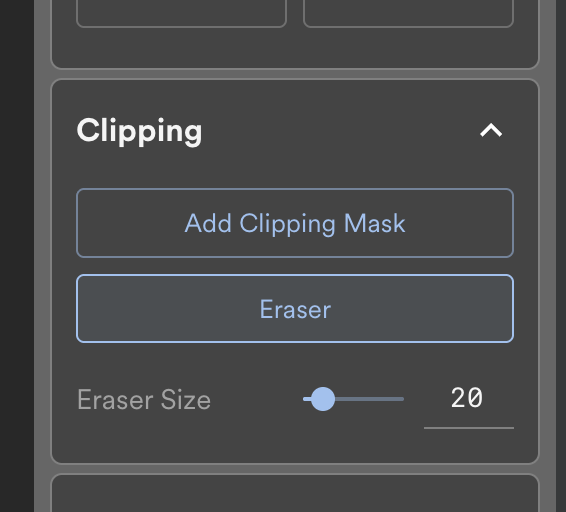
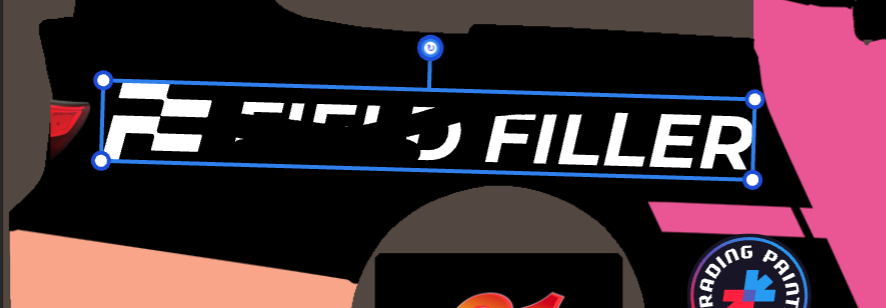
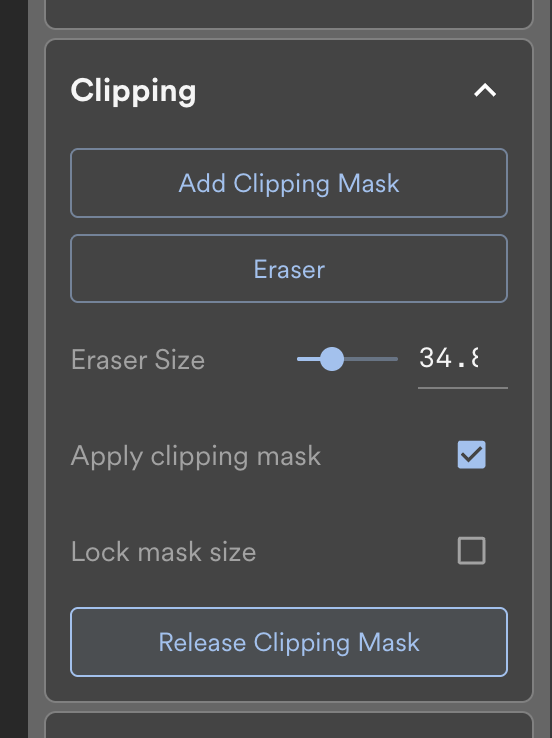
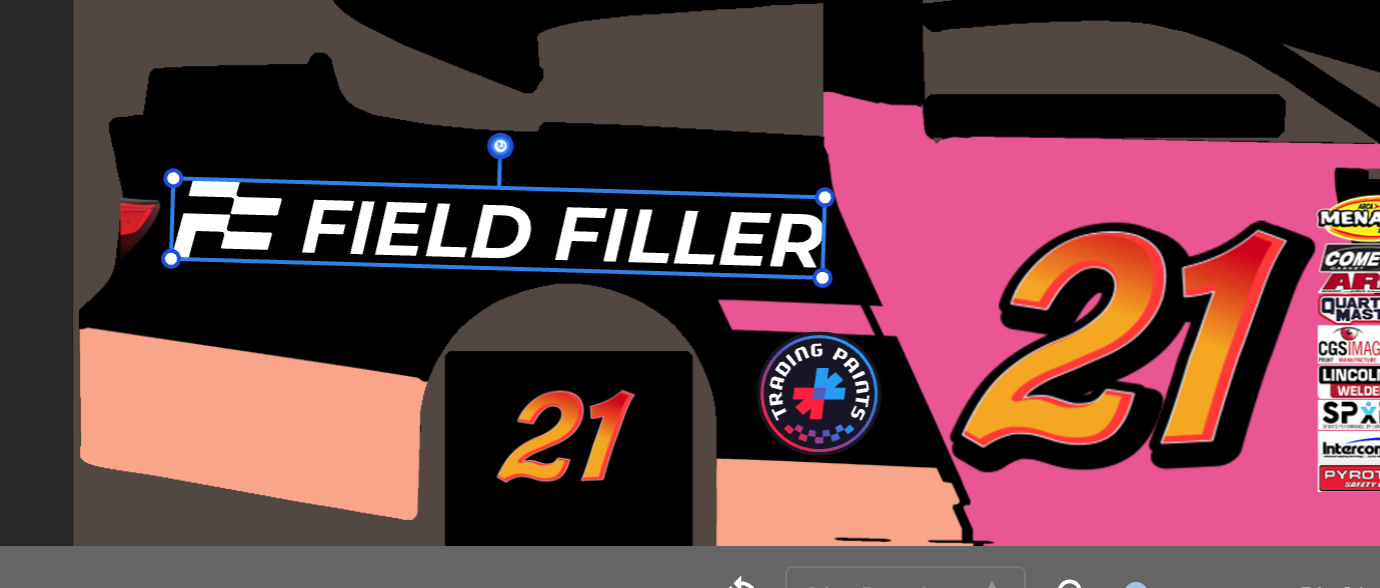
  • Layer masking/clipping has been added. This feature will let you erase a portion of a layer — most useful if you’re inserting a graphic or logo that “spills over” onto other panels of your car. To use a clipping mask, select a layer on your project, and then choose “Add Clipping Mask” in the properties panel (right column). You can then draw a shape for the portion of your layer you’d like to hide. You can choose to turn the mask on and off, and lock the size if needed. Clipping masks also work on layer groups.

Improved

  • Removed the Profile Image layer from the Clone Car Parts menu, which always displayed as a broken image.
  • On Helmets and Suits projects, removed the ability to enable Finish options (spec maps). iRacing helmets and suits do not support custom finishes.

Fixed

  • Fixed an issue where uploads with extremely long file names would break and not upload correctly.
  • Fixed some issues relating to duplicating, rotating, and mirror cloning layers with skew values applied.
  • Fixed an issue where layers with skew applied may have changed appearance when refreshing Paint Builder.
  • Fixed an issue where some shapes reset their scale value when resizing after a custom scale value was set.

Cleanup

  • Improved reliability of undo and redo actions when changes are made in the project.
  • Improved speed and efficiency of actions taken to grouped layers.

We’ve released an update to Paint Builder, adding numerous new features and bug fixes!

We’ve released an update to Paint Builder, adding numerous new features and bug fixes!

New

  • Layer grouping is now supported! You can now select multiple layers to combine into a single unit. This makes moving, rotating, and resizing much quicker across areas of a car or logo lockup. Use Shift or Ctrl/Cmd while clicking the layers you want to group, and then group them together by right-clicking and selecting “Group Layers” or pressing Ctrl/Cmd + G.
  • You can now change the assigned car on an existing project from within the project settings. This is useful if you’re building a duplicate of a paint and want to use its existing layers as a basis for a paint on a different car.
  • The right-click context menu is now available in the Layers list, instead of just on the painting canvas.
  • Added support for the %BLUESKY_NAME% shortcode for text layers. If you insert the text %BLUESKY_NAME%, your Bluesky username will be automatically displayed on the project, similarly to the way you can for %NAME%%TWITTER_NAME%%FACEBOOK_NAME%%INSTAGRAM_NAME%%TWITCH_NAME%%YOUTUBE_NAME%, and `%WEBSITE_URL%.
  • .webp images are now supported for uploaded layers.

Improved

  • By popular request, the Layers list is no longer separated into groups by Graphics, Logos & Text, and Shapes. This means that by default, you can now organize all layer types (except Base Paints) in the order you wish.
  • Shape-drawing performance has improved significantly. You’ll notice less lag when inserting a shape or drawing with the pen or polygon tools.
  • Improved performance on projects with many layers.
  • Improved memory usage when Paint Builder’s browser tab was moved out of focus and then made active again.
  • Under-the-hood architecture changes have been implemented with the goal of improving overall speed and performance.

Fixed

  • Fixed a bug where the Custom Number option was available when racing Helmets and Suits.
  • Fixed a bug where, when right-clicking a shape when another shape is already selected, the wrong context menu would appear.
  • Fixed an issue where all projects of a particular vehicle wouldn’t load if the Number Blocks painting guide couldn’t be found.

Cleanup

  • Improved app behavior when the connection between the server and the app is interrupted.
  • Updated Paint Builder to use new Trading Paints and Paint Builder logos!

We’ve released an update to Paint Builder as we’re committed to continually improving our app and your experience. Thank you for your continued support by subscribing to Trading Paints Pro!

New

  • On selected cars, your profile photo will be automatically loaded into your project’s pit sign board by default as a Car Parts layer for new projects. This functionality will be rolling out to more cars over the coming weeks.
  • You can now use the following shortcodes in text layers to dynamically insert the following: %NAME%%TWITTER_NAME%%FACEBOOK_NAME%%INSTAGRAM_NAME%%TWITCH_NAME%%YOUTUBE_NAME%%WEBSITE_URL%.
  • Added 297 new original vector illustrations to the Graphics menu so you can make your paints your own.

Improved

  • If you clone a project, it will now note which project that the new project is based off on the Projects List screen.
  • When viewing a shared project with view-only (no editing) permissions, improved clarity over which tools are enabled.

Fixed

  • Fixed a bug where Helmets and Suits were being saved as an unsupported resolution. If you raced or exported a helmet or suit from Paint Builder that does not show up in iRacing, try re-opening the project and racing it again.
  • Fixed a bug where “Sort By” was not working on the Favorite Projects screen.
  • Fixed a bug where some complex layers’ Finish options were not being saved correctly in the Spec Map file.
  • Fixed a bug where project preview thumbnails were not generating when using Paint Builder on mobile browsers.
  • Fixed a bug where view-only users of a shared project could enable or disable painting guides on a project by using keyboard shortcuts.

Cleanup

  • Improved error-message verbiage in the unlikely event a layer’s image cannot be loaded when a project is opened.
  • Various improvements intended for better performance and reliability.

We’ve cooked up a small update that makes some additional improvements to Paint Builder.

Improved

  • When using Mirror Clone on a layer with a skew or shadow offset applied, the X value of the skew and shadow are now taken into consideration.
  • If a driver’s name contains a number at the end of the name, the number won’t be included on the car in cases where we stamp the name on the signature rail or door, mainly on oval cars.
  • On projects with Finish (spec map) options enabled, we now include a link with information on how to generate the iRacing MIP file required to race with the Finish options in place on the Project Settings, Submit to Showroom and Race screens.

Fixed

  • Fixed an issue where Paint Builder would crash when trying to load a project where an invalid layer shadow color was entered, and improved validation of entered colors to prevent errors.
  • Fixed an issue where shapes’ positions slightly moved after being drawn and inserted, particularly when the canvas was rotated.
  • Fixed an issue where some font layers caused excessive use of system memory that would sometimes result in freezing.

We’ve added some new features to make your pre-season painting a little more fun.

New

  • Seamless saving! Paint Builder will no longer appear to stop and refresh the project view every few minutes, which it did previously to update the project’s preview image for the Project List screen. Instead, this process now happens silently in the background, making for a more seamless painting experience.
  • Added the option for assigning a corner radius when applying a background color to a logo. This means you can easily add a rounded-edge rectangle as a “sticker” effect.
  • Added 50 new fictional brand logos: 4-Corners, Ah Potato!, Allen Energy, Apex Air Filters, AutoFortress, Baatu, Bella’s Umbrellas, B-Main Brewing, Bukub Pumps, Camshaft Coffee Co., Check-Up Brake Inspection, Claw Oil, Clyde’s Paint, Coche Cola, Control-R Refinishing, Cornering Driving School, Delta Glass Repair, Dusty’s Truck Centers, DWOD, Eesto Records, EYV Networking, Fearless Tires, Gemini Gears, Hank’s Hardware, Hosta Performance Parts, HP4 Spark Plugs, Journeyman Tools, Lightning Wireless, Lollipop Quick-Stop, Net Cod, No Chill Antifreeze, Nyoom, OOLID Tires, Oversteer Oil, Oznot Shocks, Pole Position Polish, Satellite Secondhand Parts, Scholar Dollar, Scorpio Tire & Auto Centers, Sea Bounty, Sesame Smart-Home System, Skid-Mark Sponges, Slipstream Lubricants, STFU Hearing Protection, Tepid Water Heaters, Tempest Wiper Blades, Turbo Tree Service, Urmuted Mufflers, VISE Tools, and Wildcat Welding.

Improved

  • If ”Show when editing” is enabled on Painting Guides, those guides will now appear when using the arrow keys to move a layer.
  • Changed the default behavior of the Wireframe painting guide to show the inverse color of the items below, making it easier to see the wireframe on any color car. This option can be turned off in the properties panel.
  • Cloned Car Parts layers can now have a color fill value applied via the properties panel.
  • User-uploaded logos can now have a color fill value applied via the properties panel.
  • After uploading a new logo, the My Uploads screen will now jump to show the newly-uploaded logo instead of remaining at the top of the list where Favorites appear.
  • Made some improvements with how alpha-channel transparency is handled on vehicles with paintable window portions.

Fixed

  • Fixed an issue where some layers were changing their order when Combine Layer Groups was enabled and a Car Parts layer was cloned.
  • Fixed an issue where projects containing a font that couldn’t be loaded caused the project to display an infinite-loading spinner, and also corrected four incomplete font files that were causing this issue.
  • Fixed an issue on the My Uploads screen where if the screen height was too low or if the browser zoom level was set very far, a scrollbar would not appear for accessing logos you’ve uploaded.

Happy New Year! We’re excited to release a host of new Paint Builder features to kick off 2024.

New

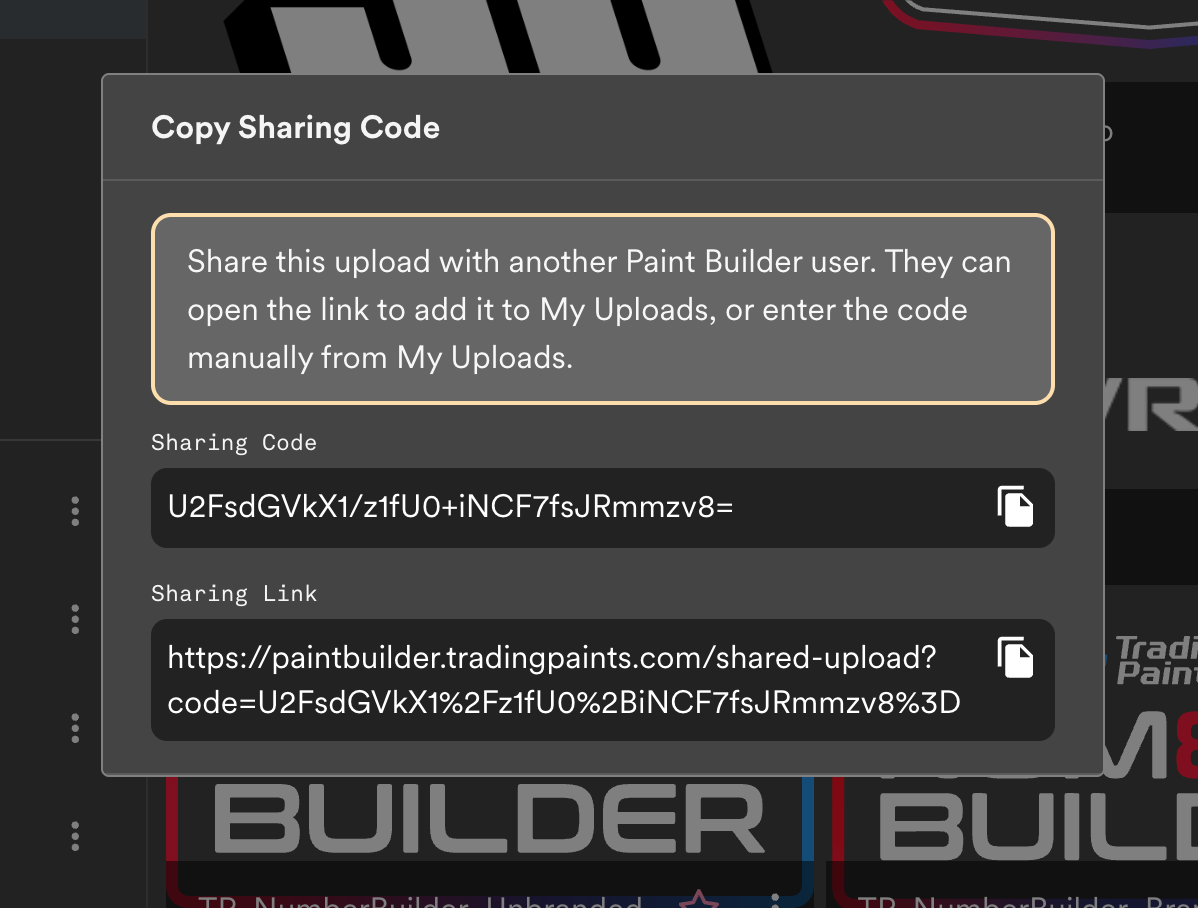
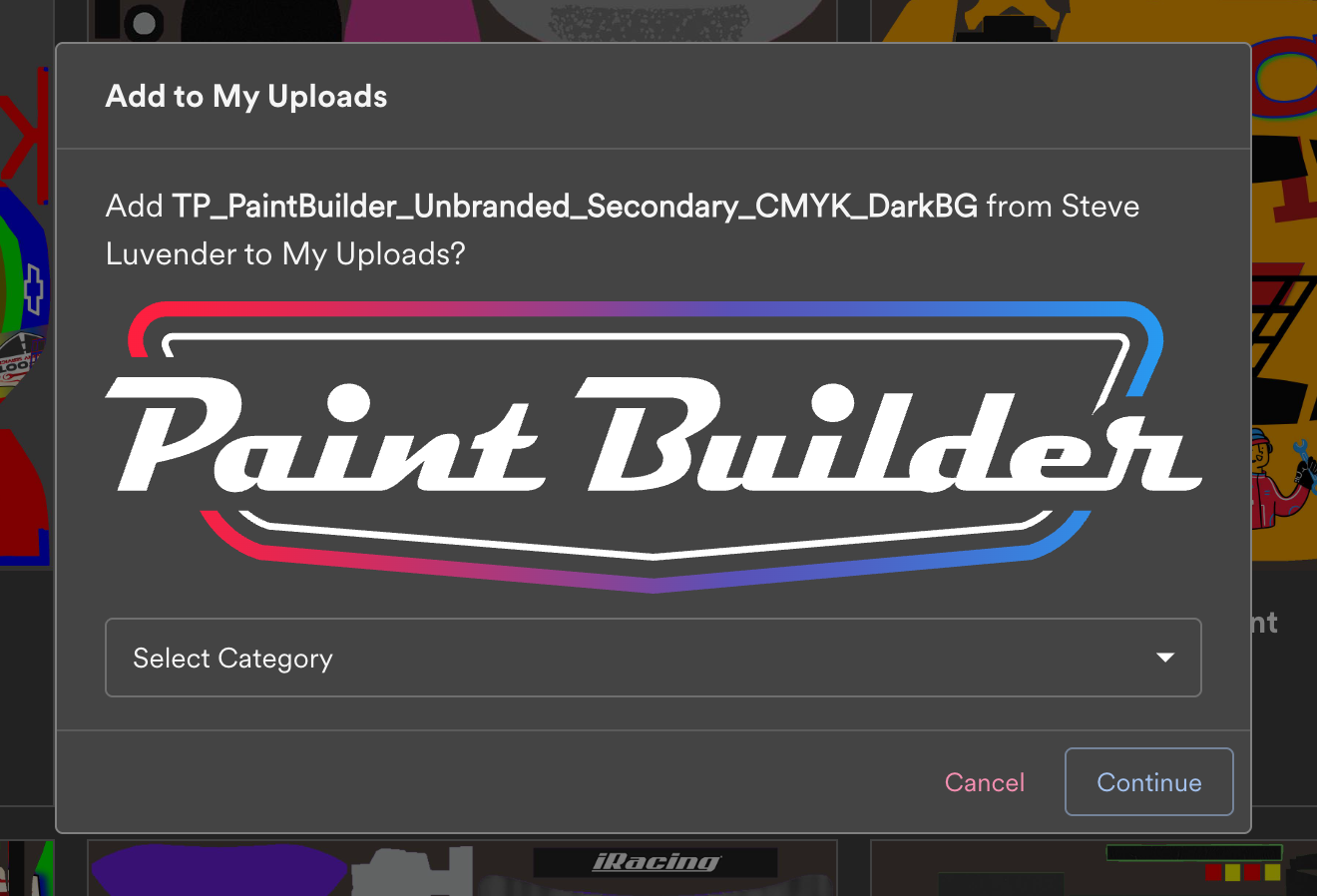
  • With the new Share Uploads feature, you can copy a code to share an item you’ve uploaded with other Paint Builder users. This will be particularly useful not only for sharing logos with friends and teammates, but also for those who design car add-on layers and wish to share with others across the web.
  • Added Mirror Clone (Duplicate + Rotate) feature. When this option is selected on a layer, Paint Builder will make a copy of the layer and rotate it to the other side of the template, while taking its existing rotation into consideration. This makes replicating items on the opposite side of the car a bit easier.
  • We’ve added 111 new original vector graphics to the Add Graphics menu. Find the new flame, checkered flag, and tribal patterns to make your Paint Builder projects your own.
  • You can now save your favorite colors to copy and reference later in the Default Shape Settings window.
  • This What’s New window will share new features and improvements to Paint Builder as we release new features.
  • We’ve added the Combine Layer Groups feature in Project Settings. When this option is enabled, all editable layer types — shapes, graphics, logos and text — can be reordered as desired without separate layer group separations for each item type. This means that with the Combine Layer Groups option enabled, you can place shapes and graphics above logos and text if you wish.

Improved

  • Improved validation for the color picker to accept hex, name, rgb, rgba, hsl, and hsla formats throughout Paint Builder.

Fixed

  • Fixed a bug that caused Paint Builder to crash when a shape layer was assigned a negative position value.
  • Fixed an issue in Firefox where submitting a project to the Trading Paints Showroom triggered a pop-up blocker message.
  • Fixed a bug on the new project dialog where fully deleting the existing text caused it to reappear.
  • Fixed a bug where double-clicking a logo or graphic from the insert screen would insert the new layer twice.

Cleanup

  • We reformatted the My Uploads screen to make better use of space for new features and show bigger previews.
  • A friendlier error message is now shown when you attempt to upload more than three logos at once.